



Choosing the right blogging platform can feel like finding a needle in a haystack. With so many options available, it’s easy to get overwhelmed. Your choice will shape your online presence and impact how you connect with your audience. Whether you’re sharing personal stories, offering expert advice, or showcasing your creative work, the right platform can make all the difference.
- Factors to consider when selecting a blogging platform
- Popular blogging platforms and their features:
- Blogging Platform with Reviews
- 1. WordPress.org ⭐ (Best Overall)
- 2. WordPress.com
- 3. Wix ⭐ (Best for Beginners)
- 4. Squarespace ⭐ (Best for Design)
- 5. Medium ⭐ (Best for Writers)
- 6. Blogger
- 7. Ghost ⭐ (Best for Professionals)
- 8. Substack
- 9. Weebly
- 10. Webflow ⭐ (Best for Designers)
- ing 24/7 assistance through email and live chat. Their extensive knowledge base helps users troubleshoot common issues efficiently.
- Comparison of pricing plans and customization options
- User-friendly interface and design templates
- SEO optimization and analytics tools
- Customer support and community resources
- Integration with social media platforms
- Migration options for changing platforms
Selecting a blogging platform is more than just picking a template; it’s about aligning your vision with functionality. Are you looking for ease of use? Customization capabilities? SEO features that boost visibility? Each platform has its strengths and weaknesses, tailoring to different needs and skill levels.
Let’s dive deep into what matters most when choosing a blogging home that fits you like a glove!
Factors to consider when selecting a blogging platform
Choosing the right blogging platform can feel overwhelming. There are several factors to consider that can significantly influence your decision.
First, think about your technical skills. If you’re not tech-savvy, you might prefer a user-friendly platform with drag-and-drop features.
Next, assess your goals for blogging. Are you looking to share personal experiences or create a professional portfolio? Your objectives will shape which features you’ll need.
Customization options also matter. Some platforms offer extensive design flexibility while others provide limited themes and layouts.
Another crucial aspect is SEO capabilities. A platform that supports optimization tools can enhance your blog’s visibility on search engines.
Consider future scalability. Will the platform grow with you as your needs evolve? These elements will play key roles in ensuring a successful blogging journey and experience.
Popular blogging platforms and their features:
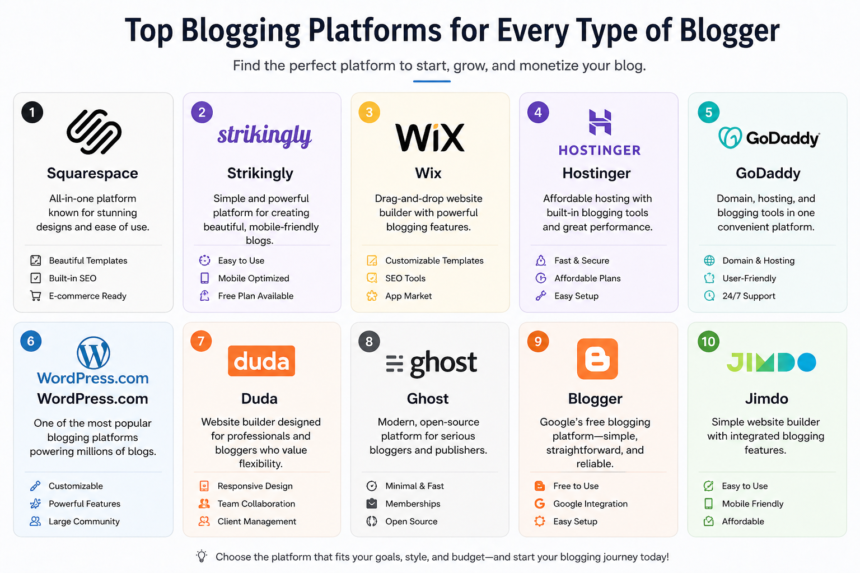
WordPress is a powerhouse in the blogging world. It offers extensive customization through thousands of themes and plugins. Whether you want a simple blog or a complex website, WordPress can handle it.
Blogger is perfect for beginners looking for an easy setup. Owned by Google, it provides seamless integration with other Google services. However, its design options are somewhat limited compared to more advanced platforms.
Tumblr caters to visual storytellers and shorter content formats. It’s great for microblogging, allowing users to share images, videos, and quotes effortlessly within a vibrant community.
Wix stands out with its drag-and-drop interface. Users can create stunning websites without needing coding skills. The flexibility in design makes Wix appealing but may require some learning time initially.
Squarespace combines elegance with functionality. Its sleek templates are ideal for creatives who prioritize aesthetics while maintaining robust features like e-commerce capabilities.
Blogging Platform with Reviews
1. WordPress.org ⭐ (Best Overall)
WordPress.org is highly praised for flexibility, SEO control, and scalability, powering over 40% of websites.
Review: Users love its customization and earning potential, but beginners often find it technical and hard to manage initially.
2. WordPress.com
A simplified version of WordPress that handles hosting and setup.
Review: Great for beginners, but many users complain about limited features unless you upgrade to paid plans.
3. Wix ⭐ (Best for Beginners)
Wix offers drag-and-drop simplicity and strong features for easy website building.
Review: Widely rated as one of the easiest platforms to use, though advanced users feel it lacks deep customization.
4. Squarespace ⭐ (Best for Design)
Squarespace is known for beautiful templates and all-in-one functionality.
Review: Users love its professional look and ease of setup, but some complain about limited flexibility and higher pricing.
5. Medium ⭐ (Best for Writers)
Medium focuses purely on writing with a built-in audience of millions.
Review: Writers enjoy instant traffic and simplicity, but dislike limited control, branding, and monetization options.
6. Blogger
A free blogging platform owned by Google with simple setup.
Review: Good for beginners and hobby bloggers, but often criticized for outdated design and limited growth options.
7. Ghost ⭐ (Best for Professionals)
Ghost is a fast, modern platform designed for content creators and publishers.
Review: Users love its speed and clean writing experience, though it requires some technical knowledge to manage.
8. Substack
Substack focuses on newsletter-style blogging and paid subscriptions.
Review: Great for monetization and direct audience connection, but limited customization and platform dependency can be drawbacks.
9. Weebly
Weebly is a simple website builder with basic blogging features.
Review: Easy to use and affordable, but users often report limited design options and fewer advanced tools.
10. Webflow ⭐ (Best for Designers)
Webflow offers advanced design control without needing coding skills.
Review: Highly praised by designers for flexibility, but beginners find it complex and time-consuming to learn.
ing 24/7 assistance through email and live chat. Their extensive knowledge base helps users troubleshoot common issues efficiently.
Comparison of pricing plans and customization options
When choosing a blogging platform, pricing plans can vary significantly. Some platforms offer free options, while others may require monthly or annual fees. It’s essential to evaluate what you’re getting for your investment.
Free tiers often have limitations on features and functionality. If you’re serious about blogging, consider paid plans for more extensive customization options and additional tools.
Customization is key to making your blog unique. Many platforms allow users to tweak layouts, color schemes, and fonts extensively. Others might limit design flexibility unless you opt for premium templates or add-ons.
Investing in the right plan can enhance user experience and help your brand stand out visually. Look at how much control each platform offers over its design elements before deciding where to stake your online presence.
User-friendly interface and design templates
A user-friendly interface makes a world of difference for bloggers. It allows you to focus on creating content rather than getting lost in complicated navigation. Look for platforms that prioritize simplicity and intuitive design.
Design templates play a crucial role too. A variety of visually appealing templates can help your blog stand out without the need for extensive design skills. Whether you’re aiming for minimalistic elegance or vibrant creativity, there’s something out there for every personality.
Customization options are essential as well. Platforms should allow you to tweak colors, fonts, and layouts easily. This flexibility helps ensure your blog reflects your unique voice while remaining functional across devices.
With the right platform, you’ll find it effortless to set up an attractive blog that engages visitors from the get-go. The perfect blend of functionality and aesthetics can transform mere words into an inviting online space.
SEO optimization and analytics tools
SEO optimization is crucial for any blog aiming to attract traffic. A good blogging platform should provide tools that help you improve your search engine ranking effortlessly.
Many platforms come equipped with built-in SEO features. These include customizable meta tags, alt text for images, and the ability to create clean URLs. Some even offer keyword suggestions tailored to your content.
Analytics tools are equally important. They allow you to track visitor behavior, page views, and bounce rates. Understanding this data helps refine your strategy over time.
Google Analytics integration is a must-have feature as well. It provides real-time insights into how users interact with your site.
Choosing a platform that prioritizes both SEO and analytics will empower you to grow your audience effectively while maintaining control over performance metrics.
Customer support and community resources
When selecting a blogging platform, robust customer support can make all the difference. Issues may arise at any time, and having access to responsive help is crucial for uninterrupted creativity.
Many platforms offer live chat or email support. Others provide extensive documentation and FAQs to troubleshoot common problems. It’s essential to evaluate what type of assistance is available before making your choice.
Community resources also play a significant role in your blogging experience. Active forums allow users to share experiences and solutions, fostering a sense of belonging among bloggers.
Some platforms have dedicated groups on social media where users can exchange tips and tricks freely.
Consider how often these communities are updated. A lively community indicates that help will be readily available when you need it most, enhancing your overall journey as a blogger.
Integration with social media platforms
Integrating your blog with social media platforms is crucial for expanding your reach. It allows you to share content effortlessly and connect with a wider audience.
Most blogging platforms offer built-in features that make sharing easy. You can automatically post new articles directly to Facebook, Twitter, or Instagram. This saves time and ensures consistency across channels.
Engagement matters too. By linking your blog to social media, readers can interact with you instantly through comments and shares. This interaction builds community and fosters loyalty among followers.
Look for platforms that support various social networks seamlessly. Some even allow customization of how posts appear when shared, enhancing visibility.
Don’t underestimate the power of analytics either. Many platforms provide insights into how well your content performs on social media, helping refine future strategies for better engagement.
Migration options for changing platforms
When it comes to blogging, flexibility can be paramount. At some point, you might find that your current platform no longer meets your needs—whether due to limitations in features or changes in your blog’s direction. That’s where migration options come into play.
Many platforms allow users to export their content, making the transition smoother than one might expect. WordPress, for instance, offers tools for exporting posts and media easily. Meanwhile, Blogger provides XML files that help transfer data efficiently.
However, keep in mind that migrating isn’t just about moving content; it’s also about transitioning design elements and retaining SEO value. Some platforms will offer detailed guides on how to ensure a seamless move without losing traffic or search rankings.
Before switching platforms, consider doing thorough research on the potential new host’s import features and customer support resources available during this process. It’s often beneficial to create a backup of all existing materials before initiating a migration.
Choosing the right blogging platform is indeed crucial for your success as a creator. By weighing these factors carefully and understanding what each option offers—including migration capabilities—you can make an informed choice tailored to your unique needs.