



Introduction to Chromebooks and their popularity: Chromebooks have taken the tech world by storm, becoming a go-to choice for students, professionals, and casual users alike. Their lightweight design, affordability, and seamless integration with Google services make them incredibly popular. However, like any other device, they are not immune to mishaps. One of the most common issues that Chromebook owners face is a broken screen. Whether it’s from an accidental drop or just everyday wear and tear, dealing with a cracked or shattered display can be frustrating.
But how much does it really cost to fix a Chromebook screen? The answer isn’t as straightforward as you might think. Various factors come into play—everything from DIY repairs to professional service options—and costs can vary significantly depending on your specific model. If you’re in this situation or want to learn more about preventative measures against such damage, keep reading!
Common causes of a broken Chromebook screen
Chromebook screens can break for various reasons, often leading to frustration for users. One common cause is accidental drops. A moment of distraction can lead to a costly repair.
Another frequent issue stems from pressure on the screen. Sitting on your Chromebok or placing heavy objects on it might crack the display without warning.
Liquid spills are also culprits in many cases. Even a small amount of liquid finding its way into the device can create devastating effects.
Manufacturing defects occasionally play a role. Some models may have inherent vulnerabilities that become apparent over time, resulting in screen failures.
Understanding these causes helps you take proactive measures to avoid mishaps and keep your Chromebok safe and functional.
DIY repairs vs professional repairs
When your Chromebook screen cracks, the first thought might be to tackle the repair yourself. DIY repairs can seem appealing. They often save money and give you a sense of accomplishment.
However, it’s important to weigh the pros and cons carefully. If you have technical skills and access to tools, fixing it yourself could be straightforward. Online tutorials are plentiful, guiding users step-by-step through replacements.
On the other hand, professional repairs offer expertise that can prevent further damage. Technicians know how to handle delicate components without risking additional issues. Plus, many shops provide warranties on their work.
Consider your comfort level with technology before deciding which route to take. Sometimes investing in a professional fix is more beneficial than risking a botched job that only escalates costs down the line.
Average cost of fixing a Chromebook screen by brand
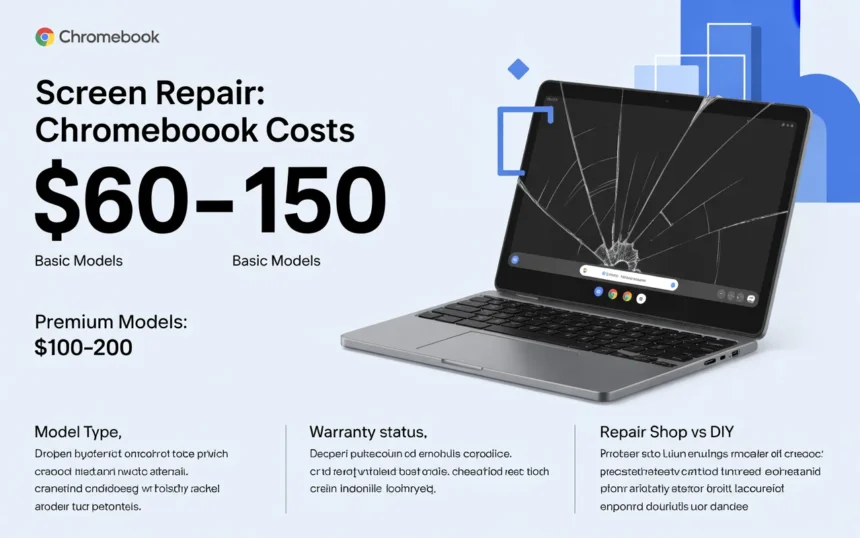
When it comes to repairing a Chromebook screen, costs can vary significantly by brand. For instance, Acer and ASUS models typically range from $60 to $120 for replacement screens. Their parts are often more accessible, making repairs a bit easier on the wallet.
On the other hand, Samsung Chromeboks may have higher repair costs due to their premium build quality. Owners can expect to pay between $100 and $200 for screen replacements. The sleek design often means specialized components.
HP Chromebooks fall somewhere in between. Repairs generally cost around $80 to $150 depending on the model’s complexity and part availability.
For Google’s Pixelbook series, prepare for the upper end of the spectrum—repairs can exceed $250 due to limited supply and high demand for genuine parts. Always check with authorized service centers or reputable technicians before proceeding with any repairs.
Tips for preventing a broken screen
Taking a few precautions can go a long way in protecting your Chromebook screen. Start by investing in a sturdy case. A well-designed, shock-absorbent cover can shield your device from accidental drops and bumps.
Avoid placing heavy items on top of your Chromebook. It might seem harmless, but pressure from books or bags can crack the screen over time.
When transporting your Chromebook, use a padded sleeve for extra protection. This small step makes a significant difference during commutes or travels.
Be mindful of where you set it down. Avoid edges of tables or countertops to reduce the risk of falls.
Keep food and drinks away from your workspace. Spills are another common cause of damage that’s easily preventable with some care and attention to detail.
Conclusion: The importance of investing in quality repairs for your Chromebook
Repairing a Chromebook screen is more than just fixing a visual issue. It’s about restoring functionality and ensuring the device lasts longer.
Investing in quality repairs can save you money in the long run. Poor fixes may lead to recurring problems, forcing you to spend even more on future services.
A professional repair ensures that all components are properly addressed. This attention to detail means your Chromebok will work as intended after the fix.
Additionally, using genuine parts maintains warranty coverage and enhances performance. Skimping on repairs might compromise other functions of your device, creating further frustration down the road.
When it comes to technology like Chromebooks, prioritizing quality pays off significantly. You rely on these devices daily; they deserve reliable care for optimal performance and longevity.
FAQ’s
Is it worth fixing a Chromebook screen?
It depends on the model—if repair costs are lower than buying a new device, it’s usually worth fixing.
How much does a Chromebook screen cost?
A replacement screen typically costs between $50 to $150, depending on the model and size.
Can Chromebook screens be repaired?
Yes, Chromebook screens can be repaired or replaced by professionals or with DIY kits.
Why is a Chromebook so cheap?
Chromebooks are affordable because they use lightweight hardware and rely on cloud-based software instead of high-end components.